# Strings & Input/Output <!-- .element: class="r-fit-text" --> Week 3 --- ## Review  <!-- .element: style="height:400px" --> -- ### How do computers store text? Binary (numbers) <!-- .element: class="fragment" --> -- ### What is a single binary digit called? Bit <!-- .element: class="fragment" --> -- ### How many bits in a byte? 8 <!-- .element: class="fragment" --> -- ### What is a variable? A name for some data <!-- .element: class="fragment" --> -- ### Can the value in a variable change? Yes! <!-- .element: class="fragment" --> It's called "re-assignment" <!-- .element: class="fragment" --> -- ### Types of _primitive_ values? - Integer (int) <!-- .element: class="fragment" --> - Floating Point Number (float) <!-- .element: class="fragment" --> - String (str) <!-- .element: class="fragment" --> - Boolean (bool) <!-- .element: class="fragment" --> - NoneType (None) <!-- .element: class="fragment" --> -- ### Types of _compound_ values? - Lists <!-- .element: class="fragment" --> - Tuples <!-- .element: class="fragment" --> - Dictionaries <!-- .element: class="fragment" --> - Sets <!-- .element: class="fragment" --> NOTE: the two that matter for this class are **lists** and **dictionaries** --- ## I/O (Input and Output) <svg xmlns="http://www.w3.org/2000/svg" viewBox="0 0 24 24" style="width:100px;fill:currentColor"><path d="M9,4H15V12H19.84L12,19.84L4.16,12H9V4Z" /></svg> -- ### Types of Input How can you give information **TO** a computer? <!-- .element: class="fragment" --> --  <!-- .element: style="height:400px" --> --  <!-- .element: style="height:400px" --> --  <!-- .element: style="height:400px" --> -- ### Types of Output How can you get information **FROM** a computer? <!-- .element: class="fragment" --> --  <!-- .element: style="height:400px" --> NOTE: not all computers have a screen! --  <!-- .element: style="height:400px" --> --  <!-- .element: style="height:400px" --> --- ## Terminals <svg xmlns="http://www.w3.org/2000/svg" viewBox="0 0 24 24" style="width:100px;fill:currentColor"><path d="M9,4H15V12H19.84L12,19.84L4.16,12H9V4Z" /></svg> -- > A "terminal" allows you interact with the computer using text :max_bytes(150000):strip_icc()/command-prompt-1fcee7b9a02c4fbbab3c526964476c97.png) <!-- .element: style="height:350px" --> -- A "console" is a physical I/O station  <!-- .element: style="height:350px" --> -- A "shell" is a command interpreter Essentially, the shell runs inside the terminal <!-- .element: class="fragment" --> -- A "command line interface" (abbreviated CLI) is a place to enter commands into a system <!-- ref: https://www.howtogeek.com/terminal-vs-command-line-vs-shell-vs-console/ --> -- We'll try stick to <span class="green">terminal</span> or <span class="green">CLI</span> NOTE: don't worry too much about the difference, just know the terms are often used interchangeably online -- Programmers use terminals a LOT Example: VPC <!-- .element: class="fragment" --> -- ### Exercise: Use a Terminal Emulator <h4><code>www.terminaltemple.com</code></h4> <!-- .element: class="green" --> --- ## Printing <svg xmlns="http://www.w3.org/2000/svg" viewBox="0 0 24 24" style="width:100px;fill:currentColor"><path d="M9,4H15V12H19.84L12,19.84L4.16,12H9V4Z" /></svg> -- In Python, outputting text to terminal is called "printing"  -- ### The `print()` function ```py print("Hello, World!") ``` -- ### Printing multiple values ```py print("Hello,", "World!") ``` NOTE: print() automatically adds a space between comma-separated values -- ### What happens here? ```py print(print) ``` NOTE: print() automatically adds a space between comma-separated values --- ## Input <svg xmlns="http://www.w3.org/2000/svg" viewBox="0 0 24 24" style="width:100px;fill:currentColor"><path d="M9,4H15V12H19.84L12,19.84L4.16,12H9V4Z" /></svg> -- ### The `input()` function ```py name = input("What is your name? ") print("Hello, " + name) ``` ```txt What is your name? Rylan Hello, Rylan ``` <!-- .element: class="fragment" --> NOTE: - input() always returns a string, even if the user types a number - How is input stored? A **variable** -- ### What's wrong here? ```py age = input("How old are you? ") print(age + 1) ``` ```txt TypeError: can only concatenate str (not "int") to str ``` <!-- .element: class="fragment" --> -- ### Converting to a number ```py age = input("How old are you? ") # Convert string to integer age = int(age) print(age + 1) ``` -- ## Exercise Write a program that asks the user a question, processes the input, and prints a response NOTE: Try processing different data types (not just strings) --- ## Working with Strings <svg xmlns="http://www.w3.org/2000/svg" viewBox="0 0 24 24" style="width:100px;fill:currentColor"><path d="M9,4H15V12H19.84L12,19.84L4.16,12H9V4Z" /></svg> -- ### Concatenation Joining strings together with `+` ```py first_name = "Ada" last_name = "Lovelace" full_name = first_name + " " + last_name print(full_name) ``` -- ### String Formatting (f-strings) ```py name = "Ada" age = 28 print(f"{name} is {age} years old") ``` NOTE: f-strings let you insert variables directly into a string -- ### Formatting decimals Use `:.Nf` to show **N** digits after the decimal ```py pi = 3.1415926535 print(f"{pi:.2f}") print(f"{pi:.4f}") ``` ```txt 3.14 3.1416 ``` <!-- .element: class="fragment" --> NOTE: - `.2f` is common for money - Python **rounds**, it does not just chop digits off - `f` means "fixed-point" (a decimal number) -- ### Money example ```py price = 4.5 print(f"That costs ${price:.2f}") ``` ```txt That costs $4.50 ``` <!-- .element: class="fragment" --> -- ### Padding (width) Put a number after the colon to set a **minimum width** ```py word = "hi" print(f"|{42:5}|") print(f"|{word:5}|") ``` ```txt | 42| |hi | ``` <!-- .element: class="fragment" --> NOTE: - Numbers are right-aligned by default - Strings are left-aligned by default - Extra spaces fill the unused width -- ### Alignment - `<` left - `>` right - `^` center ```py word = "hi" print(f"|{word:<5}|") print(f"|{word:>5}|") print(f"|{word:^5}|") ``` ```txt |hi | | hi| | hi | ``` <!-- .element: class="fragment" --> -- ### Zero-padding numbers Useful for clocks, IDs, and columns that should line up ```py hour = 9 minute = 5 print(f"{hour:02}:{minute:02}") ``` ```txt 09:05 ``` <!-- .element: class="fragment" --> NOTE: `02` means "at least 2 digits, pad with zeros" -- ### Putting it together ```py item = "apples" price = 2.5 print(f"{item:<10} ${price:>6.2f}") ``` ```txt apples $ 2.50 ``` <!-- .element: class="fragment" --> NOTE: width and decimals can be combined: `>6.2f` means right-align in 6 characters, 2 decimal places -- ### Exercise Create a program that does the following: 1. Ask user for a word or phrase 2. Ask user for width (n) 3. Print word inside frame _n_ characters wide 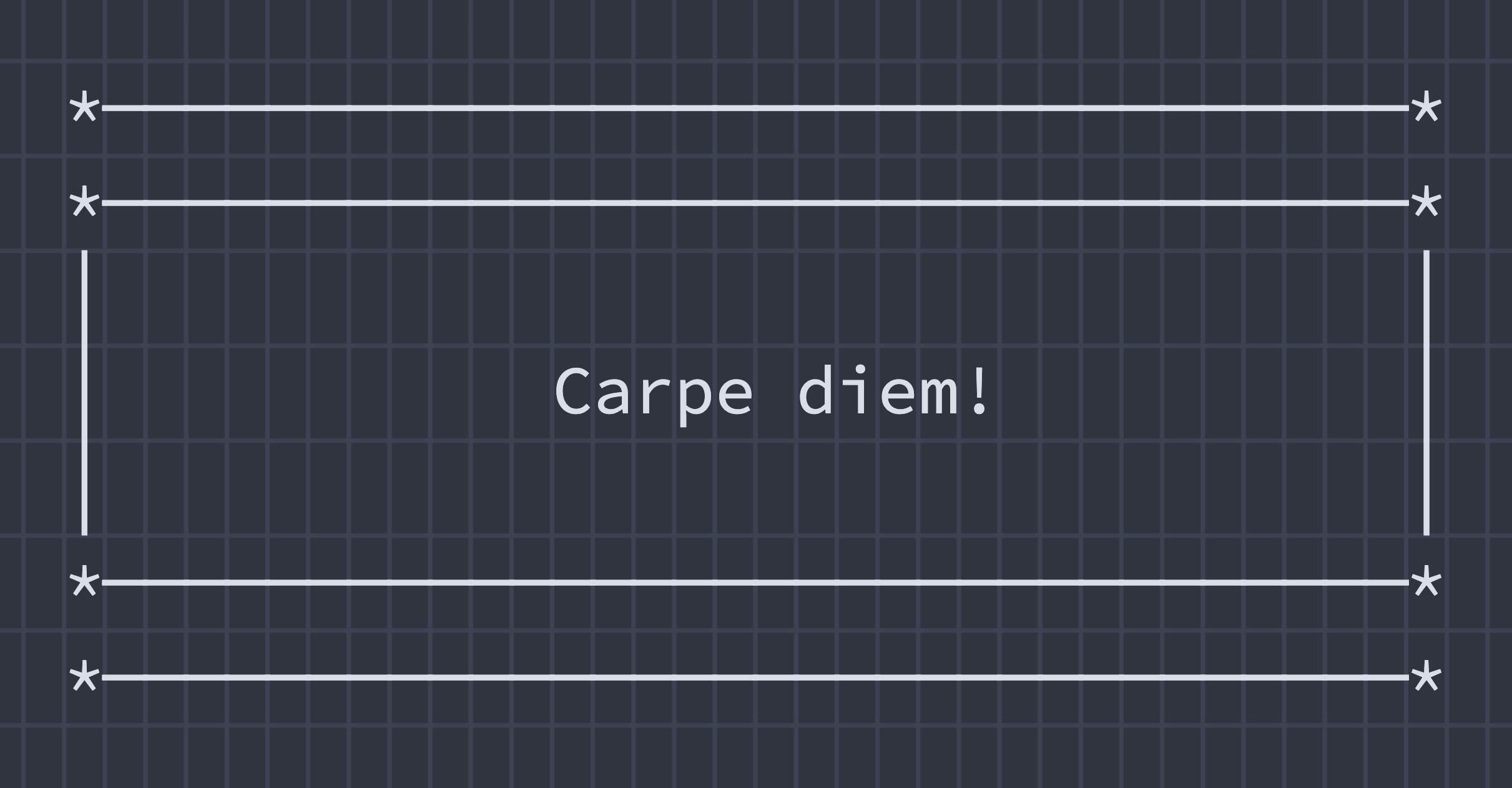 <!-- .element: style="height:200px" --> -- ```py message = input("Enter a message: ") width = input("Enter a width: ") dash = '-' line = f"*{dash:{dash}^{width}}*" message = f"|{message:^{width}}|" print() print(line) print(message) print(line) ``` ---  <!-- .element: style="height:400px" -->