# Arithmetic Week 5 NOTES: Closed laptops _unless_ we are doing an exercise. --- ## Review  <!-- .element: style="height:400px" --> -- What is a **condition**? Something that happens based on `True` or `False` <!-- .element: class="fragment green" --> -- `=` vs `==`? - Assigns a value <!-- .element: class="fragment green" --> - Compares two values <!-- .element: class="fragment green" --> -- What are the three parts of an `if`? 1. "if" keyword <!-- .element: class="fragment green" --> 2. A true/false condition <!-- .element: class="fragment green" --> 3. A colon : then an indented block <!-- .element: class="fragment green" --> -- What does `else` do? The other path — runs when the `if` was `False` <!-- .element: class="fragment green" --> -- What does `elif` do? Checks another condition when the previous one was `False` <!-- .element: class="fragment green" --> -- What is wrong with this code? ```py if x == 5 print("x is 5") ``` Missing `:` <!-- .element: class="fragment green" --> -- What is wrong with this code? ```py if x = 5: print("x is 5") ``` Assignment operator (`=`) instead of equality operator (`==`) <!-- .element: class="fragment green" --> -- What is wrong with this code? ```py if x == 5: print("x is 5") print("Conditions are cool!") ``` Invalid indentation <!-- .element: class="fragment green" --> --- ## Computing Machines <svg xmlns="http://www.w3.org/2000/svg" viewBox="0 0 24 24" style="width:100px;fill:currentColor"><path d="M9,4H15V12H19.84L12,19.84L4.16,12H9V4Z" /></svg> -- **Compute** = to calculate, to count A **computer** is a machine that does math <!-- .element: class="fragment" --> NOTE: From Latin _computare_ — "to count, to sum up." The name is literal. -- The first computers were **people** "Computer" was a job title <!-- .element: class="fragment" --> --  <!-- .element: style="height:400px" --> NOTE: 1940s–60s. Teams (often women) computed by hand for astronomy, the census, ballistics, and NASA. _Hidden Figures_ is this story. -- People are slow and make mistakes So we built **machines** to compute for us <!-- .element: class="fragment" --> --  <!-- .element: style="height:350px" --> Pascaline (1642) — gears that add and subtract NOTE: Blaise Pascal built it for his father's tax work. Still just arithmetic. --  <!-- .element: style="height:350px" --> Babbage's Difference Engine (1800s) — a steam-era calculator NOTE: Charles Babbage designed it to print math tables without human error. Ada Lovelace wrote about programming a later design of his. --  <!-- .element: style="height:350px" --> ENIAC (1945) — electronic, built to **crunch numbers** First general-purpose electronic computer <!-- .element: class="fragment" --> NOTE: Ballistics tables for the U.S. Army. 5,000 additions per second. Room-sized. Same job as the human computers, just faster. -- We call "general-purpose electronic computers" just "computers" -- Games, photos, websites, AI — still math underneath -- The CPU's core is an **ALU** Arithmetic Logic Unit: add, subtract, compare <!-- .element: class="fragment" --> NOTE: Week 2: everything is binary numbers. Text, images, sound are numbers. The ALU is the part that actually does the math. --- ## Basic Math <svg xmlns="http://www.w3.org/2000/svg" viewBox="0 0 24 24" style="width:100px;fill:currentColor"><path d="M9,4H15V12H19.84L12,19.84L4.16,12H9V4Z" /></svg> -- | Operator | Meaning | | --- | --- | | `+` | add | | `-` | subtract | | `*` | multiply | | `/` | divide | -- `+` add ```py print(3 + 2) ``` ```txt 5 ``` <!-- .element: class="fragment" --> -- `-` subtract ```py print(3 - 2) ``` ```txt 1 ``` <!-- .element: class="fragment" --> -- `*` multiply ```py print(3 * 2) print(3 * 4.0) ``` ```txt 6 12.0 ``` <!-- .element: class="fragment" --> `*` gives a **float** if at least one of the **operands** is a float <!-- .element: class="fragment" --> -- `/` divide ```py print(3 / 2) print(3 / 3) ``` ```txt 1.5 1.0 ``` <!-- .element: class="fragment" --> `/` always gives a **float** <!-- .element: class="fragment" --> -- What is the output of each line? ```py print(10 + 3) # 1 print(10 - 3) # 2 print(10 * 3) # 3 print(10 / 3) # 4 ``` - 13 <!-- .element: class="fragment green" --> - 7 <!-- .element: class="fragment green" --> - 30 <!-- .element: class="fragment green" --> - 3.333... <!-- .element: class="fragment green" --> --- ## More Math <svg xmlns="http://www.w3.org/2000/svg" viewBox="0 0 24 24" style="width:100px;fill:currentColor"><path d="M9,4H15V12H19.84L12,19.84L4.16,12H9V4Z" /></svg> -- | Operator | Meaning | | --- | --- | | `//` | integer division | | `%` | remainder (modulo) | | `**` | exponent (power) | -- `//` integer division Drops the remainder <!-- .element: class="fragment" --> ```py print(7 / 2) print(7 // 2) ``` <!-- .element: class="fragment" --> ```txt 3.5 3 ``` <!-- .element: class="fragment" --> -- `%` remainder (modulo) ```py print(7 % 2) ``` ```txt 1 ``` <!-- .element: class="fragment" --> -- `**` exponent (power) ```py print(3 ** 2) ``` ```txt 9 ``` <!-- .element: class="fragment" --> -- What is the output of each line? ```py print(11 // 4) # 1 print(11 % 4) # 2 print(2 ** 3) # 3 ``` 1. 2 <!-- .element: class="fragment green" --> 2. 3 <!-- .element: class="fragment green" --> 3. 8 <!-- .element: class="fragment green" --> -- Modulo is useful for **even vs odd** ```py [2] number = int(input("Enter a number: ")) is_even = number % 2 == 0 if is_even: print(number, "is even") else: print(number, "is odd") ``` NOTE: Even numbers have remainder 0 when divided by 2. -- Example: calculating **times** ```py duration = 90 hours = minutes // 60 minutes = duration % 60 print(f'{hours} hr and {minutes} min') ``` --- ## Order of Operations <svg xmlns="http://www.w3.org/2000/svg" viewBox="0 0 24 24" style="width:100px;fill:currentColor"><path d="M9,4H15V12H19.84L12,19.84L4.16,12H9V4Z" /></svg> -- Same order as math class 1. Parentheses: `()` 2. Exponents `**` 3. Multiply & divide: `* / // %` 4. Add & subtract: `+ -` -- ```py print(2 + 3 * 4) # 14, not 20 print((2 + 3) * 4) # 20 ``` -- What is the output? ```py print(2 ** 3 + 1) ``` `9` — exponent first, then add <!-- .element: class="fragment green" --> -- What is the output? ```py print(10 - 6 / 2) ``` `7.0` — divide first, then subtract <!-- .element: class="fragment green" --> -- When in doubt, use parentheses ```py print((10 - 6) / 2) # 2.0 ``` --- ## Assignment Shorthand <svg xmlns="http://www.w3.org/2000/svg" viewBox="0 0 24 24" style="width:100px;fill:currentColor"><path d="M9,4H15V12H19.84L12,19.84L4.16,12H9V4Z" /></svg> -- `=` stores a value in a variable ```py score = 0 ``` -- To change a value, use it on both sides ```py score = 0 score = score + 1 print(score) # 1 ``` -- Shorthand: do the math **and** assign | Long way | Short way | | --- | --- | | `score = score + 1` | `score += 1` | | `score = score - 1` | `score -= 1` | | `score = score * 2` | `score *= 2` | | `score = score / 2` | `score /= 2` | NOTE: Students already used `+=` on the quiz. -- What's wrong here? ```py [] count += 1 ``` `count` was never assigned a starting value <!-- .element: class="fragment green" --> ```py [] count = 0 count += 1 ``` <!-- .element: class="fragment" --> -- What is the result? ```py some_number = 8 some_number *= 2 ``` ```txt 16 ``` <!-- .element: class="fragment" --> -- What is the result? ```py some_number = 90 some_number //= 2 ``` ```txt 45 ``` <!-- .element: class="fragment" --> -- What is the result? ```py some_number = 90 some_number %= 2 ``` ```txt 0 ``` <!-- .element: class="fragment" --> --- ## String Math <svg xmlns="http://www.w3.org/2000/svg" viewBox="0 0 24 24" style="width:100px;fill:currentColor"><path d="M9,4H15V12H19.84L12,19.84L4.16,12H9V4Z" /></svg> -- `+` on strings **concatenates** (joins) ```py print("10" + "3") print("Hello, " + "World!") ``` ```txt 103 Hello, World! ``` <!-- .element: class="fragment" --> -- What's wrong here? ```py a = input("First number: ") b = input("Second number: ") print(a + b) ``` `input()` returns strings, so `+` concatenates <!-- .element: class="fragment green" --> ```txt First number: 10 Second number: 3 103 ``` <!-- .element: class="fragment" --> -- Convert first, then do math ```py a = float(input("First number: ")) b = float(input("Second number: ")) print(a + b) ``` ```txt First number: 10 Second number: 3 13.0 ``` <!-- .element: class="fragment" --> NOTE: `int()` for whole numbers, `float()` for decimals. `float("10")` works. `int("10.5")` does not. -- `*` on a string **repeats** it ```py print("ha" * 3) print("-" * 10) ``` ```txt hahaha ---------- ``` <!-- .element: class="fragment" --> -- What is the output of each line? ```py print("2" + "2") # 1 print(2 + 2) # 2 print("2" * 3) # 3 ``` - 22 <!-- .element: class="fragment green" --> - 4 <!-- .element: class="fragment green" --> - 222 <!-- .element: class="fragment green" --> --- ## Exercise Create a program that does the following: 1. Ask user for a word or phrase 2. Compute the word length using `len()` 3. Print word in frame, computed with math 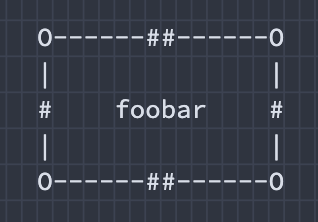 <!-- .element: style="height:200px" --> -- ```py word = input("Type a word: ") word_width = len(word) line = '-' * (word_width + 8) spaces = ' ' * (word_width + 8) print(f"O{line}O") print(f"|{spaces}|") print(f"| {word} |") print(f"|{spaces}|") print(f"O{line}O") ``` ---  <!-- .element: style="height:400px" -->