# Boolean Logic Week 6 NOTES: Closed laptops _unless_ we are doing an exercise. --- ## Review  <!-- .element: style="height:400px" --> -- What does the `/` operator do? Divides <!-- .element: class="fragment green" --> Always produces a floating point number <!-- .element: class="fragment" --> -- What does the `//` operator do? Floor division <!-- .element: class="fragment green" --> Always produces an integer <!-- .element: class="fragment" --> -- What does the `%` operator do? Modulus (remainder) <!-- .element: class="fragment green" --> -- What does the `**` operator do? Exponentiation <!-- .element: class="fragment green" --> -- What does the `*=` operator do? Multiplication and assignment <!-- .element: class="fragment green" --> -- What is the output? ```py print(2 + 3 * 4) ``` `14` <!-- .element: class="fragment green" --> -- What is the output? ```py print(13 // 5) print(13 % 5) ``` ```txt 2 3 ``` <!-- .element: class="fragment green" --> -- What type of value does a comparison produce? ```py age >= 18 ``` A Boolean: `True` or `False` <!-- .element: class="fragment green" --> -- Which symbol checks whether two values are equal? `==` <!-- .element: class="fragment green" --> NOTE: `=` assigns; `==` compares. --- ## Logic Gates <svg xmlns="http://www.w3.org/2000/svg" viewBox="0 0 24 24" style="width:100px;fill:currentColor"><path d="M9,4H15V12H19.84L12,19.84L4.16,12H9V4Z" /></svg> -- The brain of a computer is the **CPU** The core of the CPU is the **ALU** <!-- .element: class="fragment" --> How can you do math with electricity? <!-- .element: class="fragment" --> -- A **circuit board** 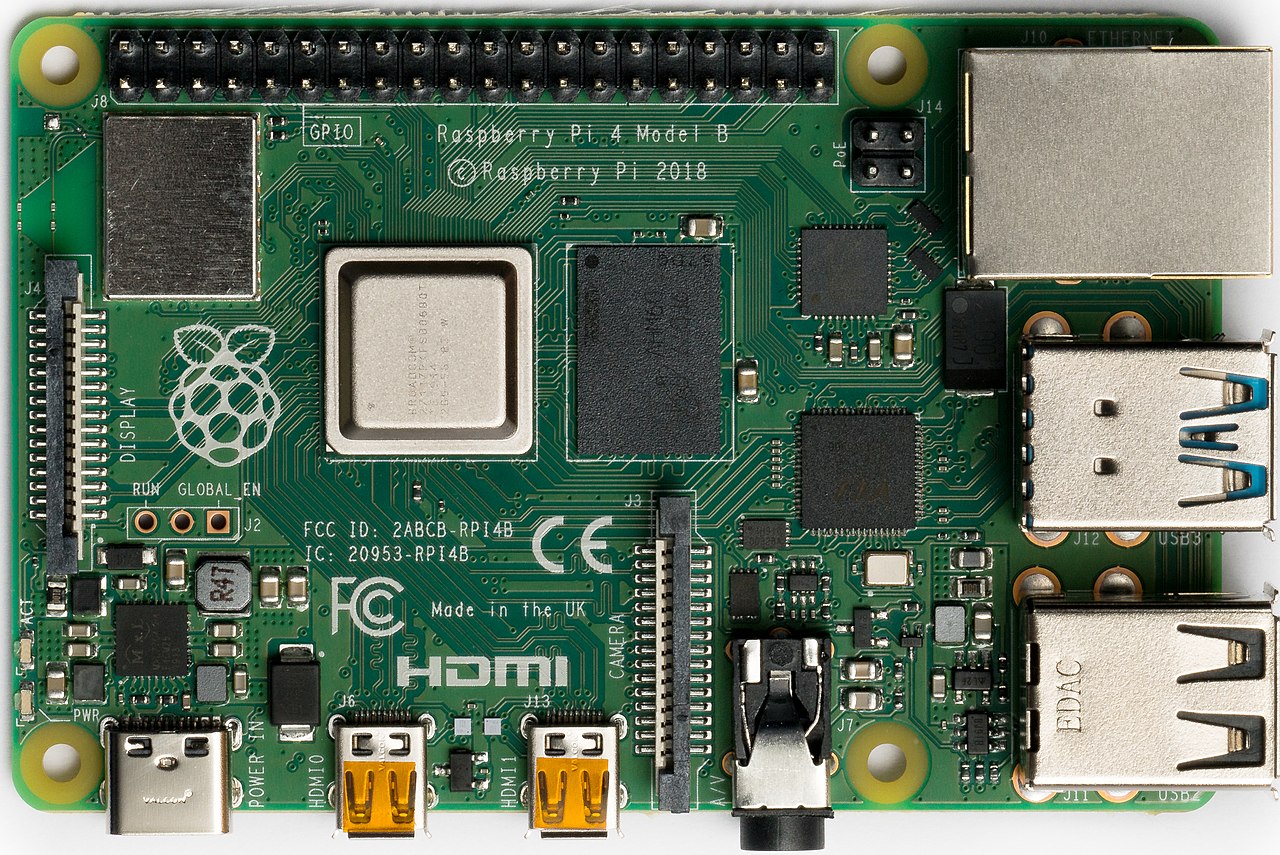 <!-- .element: style="height:320px" --> NOTE: Also called a PCB (printed circuit board). The copper lines are traces. A desktop's large board is the motherboard — same job, more parts. Point out the black square near the middle: that is the CPU. -- The **CPU** is the chip that follows instructions  <!-- .element: style="height:280px" --> NOTE: The metal lid covers the silicon. The ALU is the part of this chip that does arithmetic and comparisons. -- Inside that chip: billions of **transistors** A transistor is a tiny switch. It is on or off. | Signal | Bit | Boolean | | --- | --- | --- | | on | <code class="green">1</code> | <code class="green">True</code> | | off | <code class="red">0</code> | <code class="red">False</code> | NOTE: Week 2: a bit is a single 0 or 1. Three names for one fact. -- Transistors are wired into **logic gates** A gate reads one or more on/off inputs and produces one on/off output -- Three gates do almost all of the deciding | Gate | Output is on when... | | --- | --- | | **AND** | both inputs are on | | **OR** | at least one input is on | | **NOT** | the input is off | Python spells these `and`, `or`, and `not` <!-- .element: class="fragment" --> -- **AND** — both inputs must be 1 | A | B | AND | | --- | --- | --- | | <code class="green">1</code> | <code class="green">1</code> | <code class="green">1</code> | | <code class="green">1</code> | <code class="red">0</code> | <code class="red">0</code> | | <code class="red">0</code> | <code class="green">1</code> | <code class="red">0</code> | | <code class="red">0</code> | <code class="red">0</code> | <code class="red">0</code> | -- **OR** — at least one input is 1 | A | B | OR | | --- | --- | --- | | <code class="green">1</code> | <code class="green">1</code> | <code class="green">1</code> | | <code class="green">1</code> | <code class="red">0</code> | <code class="green">1</code> | | <code class="red">0</code> | <code class="green">1</code> | <code class="green">1</code> | | <code class="red">0</code> | <code class="red">0</code> | <code class="red">0</code> | -- **NOT** — flips the input | A | NOT | | --- | --- | | <code class="green">1</code> | <code class="red">0</code> | | <code class="red">0</code> | <code class="green">1</code> | -- What is each output? - AND of 1 and 0 <!-- .element: class="fragment" --> - OR of 0 and 0 <!-- .element: class="fragment" --> - NOT of 1 <!-- .element: class="fragment" --> `0`, `0`, and `0` <!-- .element: class="fragment green" --> -- Those same gates can **add** Binary addition goes one column at a time, like addition by hand ```txt 1 0 + 1 1 ``` NOTE: Optional walk-through if the room wants it: right column 0 + 1 = 1. Left column 1 + 1 writes 0 and carries 1. Result is 101, which is 5. And 2 + 3 = 5. The next slides only need 1 + 1. -- One bit plus one bit | A | B | Sum | Carry | | --- | --- | --- | --- | | <code class="red">0</code> | <code class="red">0</code> | <code class="red">0</code> | <code class="red">0</code> | | <code class="red">0</code> | <code class="green">1</code> | <code class="green">1</code> | <code class="red">0</code> | | <code class="green">1</code> | <code class="red">0</code> | <code class="green">1</code> | <code class="red">0</code> | | <code class="green">1</code> | <code class="green">1</code> | <code class="red">0</code> | <code class="green">1</code> | `1 + 1` is `10` in binary: sum `0`, carry `1` NOTE: Same pattern as decimal: 5 + 5 writes 0 and carries 1. -- Try a two-bit addition ```txt 0 1 + 0 1 ``` Sum bit? Carry? Sum `0`, carry `1` <!-- .element: class="fragment green" --> -- Two gates build that table **XOR** is on when the inputs are different → the sum <!-- .element: class="fragment" --> **AND** is on when both inputs are 1 → the carry <!-- .element: class="fragment" --> That pair is a **half adder** <!-- .element: class="fragment" --> NOTE: XOR means exclusive or — one or the other. Python has no `xor` keyword, and today's code will not need it. The CPU uses XOR on every addition. --  <!-- .element: style="height:400px" --> -- Each column takes the carry from the column on its right The ALU chains one **full adder** per bit NOTE: A full adder adds three bits: A, B, and the carry-in. It is two half adders plus an OR. Subtract and compare are built from this same adder. A 64-bit CPU does every column at once. -- Circuit board holds the CPU CPU has billions of logic gates <!-- .element: class="fragment" --> Logic gates do math <!-- .element: class="fragment" --> NOTE: remember that computers are short for "electronic general purpose computer" --  <!-- .element: style="height:350px" --> Enough of the low-level stuff! <!-- .element: class="fragment" --> NOTE: now is the time to stretch, blink your eyes, and take a deep breath --- ## Combining Conditions <svg xmlns="http://www.w3.org/2000/svg" viewBox="0 0 24 24" style="width:100px;fill:currentColor"><path d="M9,4H15V12H19.84L12,19.84L4.16,12H9V4Z" /></svg> -- Conditions often depend on **multiple facts** - Correct username and password <!-- .element: class="fragment" --> - Saturday or Sunday <!-- .element: class="fragment" --> - Ticket is not expired <!-- .element: class="fragment" --> -- You _could_ do this nested `if` statements... ```py if is_sunday: print('It is the weekend!') if is_saturday: print('It is the weekend!') ``` <!-- .element: class="fragment" --> -- ...but there is a better way! Boolean logic <!-- .element: class="fragment green" --> -- Python has three logical operators: | Operator | Meaning | | --- | --- | | `and` | both conditions | | `or` | at least one condition | | `not` | opposite of a condition | -- Logical operators combine or change Boolean values ```py is_tall_enough = height >= 48 is_old_enough = age >= 10 can_ride = is_tall_enough and is_old_enough ``` -- A combined condition is still just one Boolean value ```py print(True and False) ``` ```txt False ``` <!-- .element: class="fragment" --> --- ## `and` <svg xmlns="http://www.w3.org/2000/svg" viewBox="0 0 24 24" style="width:100px;fill:currentColor"><path d="M9,4H15V12H19.84L12,19.84L4.16,12H9V4Z" /></svg> -- `and` requires **both** conditions to be `True` ```py age = 12 height = 55 if age >= 12 and height >= 54: print("You can ride!") ``` -- An `and` truth table | A | B | A `and` B | | --- | --- | --- | | <code class="green">True</code> | <code class="green">True</code> | <code class="green">True</code> | | <code class="green">True</code> | <code class="red">False</code> | <code class="red">False</code> | | <code class="red">False</code> | <code class="green">True</code> | <code class="red">False</code> | | <code class="red">False</code> | <code class="red">False</code> | <code class="red">False</code> | NOTE: A truth table lists every possible input and its result. -- Think of `and` as two locked doors You need **both keys** to get through -- What is the result? ```py print(7 > 3 and 10 > 5) ``` `True` <!-- .element: class="fragment green" --> -- What is the result? ```py print(7 > 3 and 10 < 5) ``` `False` <!-- .element: class="fragment green" --> -- Does the message print? ```py has_ticket = True is_on_time = False if has_ticket and is_on_time: print("Enjoy the show!") ``` No — one condition is `False` <!-- .element: class="fragment green" --> --- ## `or` <svg xmlns="http://www.w3.org/2000/svg" viewBox="0 0 24 24" style="width:100px;fill:currentColor"><path d="M9,4H15V12H19.84L12,19.84L4.16,12H9V4Z" /></svg> -- `or` requires **at least one** condition to be `True` ```py day = "Saturday" if day == "Saturday" or day == "Sunday": print("It is the weekend!") ``` -- An `or` truth table | A | B | A `or` B | | --- | --- | --- | | <code class="green">True</code> | <code class="green">True</code> | <code class="green">True</code> | | <code class="green">True</code> | <code class="red">False</code> | <code class="green">True</code> | | <code class="red">False</code> | <code class="green">True</code> | <code class="green">True</code> | | <code class="red">False</code> | <code class="red">False</code> | <code class="red">False</code> | -- Think of `or` as two doors Either door can let you through -- What is the result? ```py print(7 > 3 or 10 < 5) ``` `True` <!-- .element: class="fragment green" --> -- What is the result? ```py print(7 < 3 or 10 < 5) ``` `False` <!-- .element: class="fragment green" --> -- Does the message print? ```py has_pass = False has_ticket = True if has_pass or has_ticket: print("You may enter.") ``` Yes — one condition is `True` <!-- .element: class="fragment green" --> -- This does **not** work: ```py if answer == "yes" or "y": print("You said yes.") ``` It always runs <!-- .element: class="fragment red" --> NOTE: Each side of `or` needs to be a complete condition. A non-empty string is treated as true; truthiness will be covered later. -- Repeat the variable and comparison ```py if answer == "yes" or answer == "y": print("You said yes.") ``` --- ## `not` <svg xmlns="http://www.w3.org/2000/svg" viewBox="0 0 24 24" style="width:100px;fill:currentColor"><path d="M9,4H15V12H19.84L12,19.84L4.16,12H9V4Z" /></svg> -- `not` flips a Boolean value ```py print(not True) print(not False) ``` ```txt False True ``` <!-- .element: class="fragment" --> -- A `not` truth table | A | `not` A | | --- | --- | | <code class="green">True</code> | <code class="red">False</code> | | <code class="red">False</code> | <code class="green">True</code> | -- ```py is_raining = False if not is_raining: print("No umbrella needed.") ``` What does `not is_raining` equal? `True` <!-- .element: class="fragment green" --> -- ```py password = input("Password: ") if not password == "swordfish": print("Access denied.") ``` More commonly written: ```py if password != "swordfish": print("Access denied.") ``` <!-- .element: class="fragment" --> -- `not` is useful with clearly named Boolean variables ```py is_closed = hour >= 9 if not is_closed: print("Come on in!") ``` Read it aloud: “if **not closed**” -- What is the output? ```py is_full = True if not is_full: print("Seats available") else: print("Sold out") ``` `Sold out` <!-- .element: class="fragment green" --> --- ## Combining Logic <svg xmlns="http://www.w3.org/2000/svg" viewBox="0 0 24 24" style="width:100px;fill:currentColor"><path d="M9,4H15V12H19.84L12,19.84L4.16,12H9V4Z" /></svg> -- Conditions can use more than one logical operator ```py if age >= 12 and (height >= 54 or with_adult): print("You can ride!") ``` -- Use parentheses to show which conditions belong together ```py age >= 12 and (height >= 54 or with_adult) ``` 1. Tall enough **or** with an adult 2. **And** old enough -- Without parentheses, Python uses this order: 1. Comparisons: `==`, `!=`, `<`, `>`, `<=`, `>=` 2. `not` 3. `and` 4. `or` NOTE: Arithmetic happens before comparisons. The complete precedence table is longer; this is the relevant portion. -- When in doubt, use parentheses ```py if (age >= 12) and (height >= 54): print("You can ride!") ``` The extra parentheses are optional, but readable -- What is the result? ```py True or False and False ``` `True` <!-- .element: class="fragment green" --> `and` is evaluated first <!-- .element: class="fragment" --> -- Parentheses can change the result ```py (True or False) and False ``` `False` <!-- .element: class="fragment green" --> --- ## Building Boolean Variables <svg xmlns="http://www.w3.org/2000/svg" viewBox="0 0 24 24" style="width:100px;fill:currentColor"><path d="M9,4H15V12H19.84L12,19.84L4.16,12H9V4Z" /></svg> -- Comparisons can be stored in variables ```py age = 10 height = 50 is_old_enough = age >= 8 is_tall_enough = height >= 42 ``` -- Then combine the variables ```py can_ride = is_old_enough and is_tall_enough if can_ride: print("You can ride!") ``` -- Good Boolean names sound like yes/no questions - `is_old_enough` - `has_ticket` - `is_raining` - `can_play` NOTE: Prefixes such as `is_`, `has_`, and `can_` make the type and purpose clear. -- Convert a yes/no answer into a Boolean ```py answer = input("Is it raining? (yes/no): ") is_raining = answer.lower() == "yes" ``` -- What value is stored? ```txt Is it raining? (yes/no): YES ``` `is_raining` is `True` <!-- .element: class="fragment green" --> NOTE: `.lower()` produces `"yes"` before the comparison. -- This keeps the condition easy to read ```py if is_raining or temperature < 50: print("Bring a jacket!") ``` --- ## Snow Day Example <svg xmlns="http://www.w3.org/2000/svg" viewBox="0 0 24 24" style="width:100px;fill:currentColor"><path d="M9,4H15V12H19.84L12,19.84L4.16,12H9V4Z" /></svg> -- Ask for today's weather ```py snow = int(input("Inches of snow: ")) temperature = int(input("Temperature (F): ")) answer = input("Are the roads plowed? (yes/no): ") roads_plowed = answer.lower() == "yes" ``` -- School is **closed** if: > At least 6 inches of snow **or** below -10 degrees ```py if snow >= 6 or temperature < -10: print("Snow day! School is closed.") ``` -- School has a **late start** if: > At least 2 inches of snow **and** the roads are **not** plowed ```py elif snow >= 2 and not roads_plowed: print("Late start.") else: print("School is open.") ``` NOTE: `elif` works here because only one outcome should happen. Checked in order, so "closed" wins over "late start." -- Test case: ```txt snow = 3 temperature = 20 roads_plowed = False ``` What happens? Late start <!-- .element: class="fragment green" --> -- Test case: ```txt snow = 1 temperature = -15 roads_plowed = True ``` What happens? Snow day — too cold <!-- .element: class="fragment green" --> -- Test case: ```txt snow = 4 temperature = 25 roads_plowed = True ``` What happens? School is open <!-- .element: class="fragment green" --> -- ### Exercise Add a **sledding** check after the school message Good sledding if: - At least 3 inches of snow - **And** the temperature is at least 10 degrees -- ```py if snow >= 3 and temperature >= 10: print("Good sledding weather!") ``` NOTE: This is a separate `if`, not part of the `elif` chain — sledding can happen on any of the three school outcomes. --- ## Common Mistakes <svg xmlns="http://www.w3.org/2000/svg" viewBox="0 0 24 24" style="width:100px;fill:currentColor"><path d="M9,4H15V12H19.84L12,19.84L4.16,12H9V4Z" /></svg> -- Using `=` instead of `==` ```py if answer = "yes": print("Yes!") ``` Use `==` to compare <!-- .element: class="fragment green" --> -- Leaving out part of a comparison ```py if age == 12 or 13: print("Teen ticket") ``` ```py if age == 12 or age == 13: print("Teen ticket") ``` <!-- .element: class="fragment green" --> -- Choosing the wrong operator > Username **and** password must both be correct ```py if username == "ada" or password == "python": ``` This lets someone log in with only one correct <!-- .element: class="fragment red" --> -- How do you choose? - Requirements that must **all** pass: `and` - Alternatives where **either** can pass: `or` - The opposite of a condition: `not` --- ## Exercise Create a game night checker 1. Ask if homework is done (yes/no) 2. Ask if it is the weekend (yes/no) 3. Ask for the current hour (0–23) 4. Print a message for each rule that is `True` -- | Message | Rule | | --- | --- | | "You can play video games!" | homework done **and** hour < 21 | | "Movie night!" | weekend **or** homework done | | "Do your homework!" | **not** homework done | NOTE: Test boundary values such as hour 20 vs. hour 21. -- Before you finish, test at least three situations: 1. Homework done at 7pm on a weeknight 2. Homework not done on the weekend 3. Homework done at 10pm on a weeknight ---  <!-- .element: style="height:400px" -->